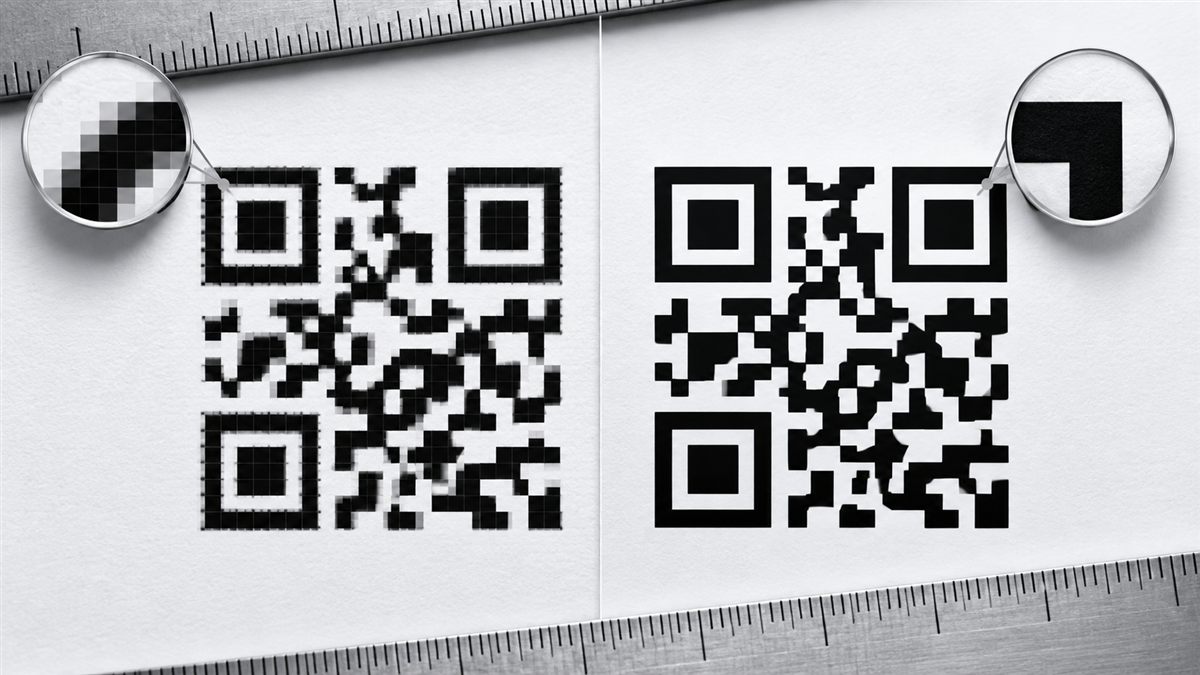
Use a sufficiently large PNG when you need a widely supported raster image for a website, document or design. Use SVG when your design software and printer accept vector artwork and you need flexible scaling. Either can work for print: the final size, contrast, margin, export and physical proof matter more than the extension alone.
QRPathway's preview shows SVG, PNG, JPG and WebP download options. Check what your account and destination software support, and scan the actual output before ordering a large print run.
PNG and SVG at a glance
| Question | PNG | SVG |
|---|---|---|
| How is it represented? | A grid of pixels. | Vector-based shapes described in a file. |
| Resizing | Enlarging a small image can blur or pixelate its edges. | Shapes can generally scale cleanly in software that supports them. |
| Common use | Websites, documents and design tools accepting raster images. | Print or design workflows that accept vector artwork. |
| What to check | Export enough pixels for the intended size and avoid destructive compression. | Confirm the receiving app renders the file correctly and preserves the border and contrast. |
SVG support is not identical in every tool or account. Some design applications convert an SVG to pixels during export, so inspect the finished PDF or print proof. A PNG can be an excellent choice when it is created at appropriate resolution and placed without excessive enlargement.
Download the code from QRPathway
- Create the appropriate QR type and check that the destination or encoded information is correct.
- Open the preview's download options and choose the format your workflow needs.
- Save the original file with a recognizable name. Avoid using a screenshot or a file that has been repeatedly resaved.
- Place it in your design without stretching or cropping the surrounding margin.
- Export the final artwork and scan it on real devices. If it will be printed, test a proof on the final material at the intended size.

If you use transparency, make sure the code remains dark against a light background wherever it is placed. A format that supports transparency does not guarantee sufficient contrast.
Choose for a specific job
Website or email: A clear PNG is commonly easy to place. Include a normal clickable link for a visitor viewing the page on the same phone. Avoid serving an unnecessarily huge image when a smaller, sharp asset will do.
Business card: Ask the designer or printer which format they accept. Both a suitable PNG and SVG may work. Check the code at the actual small size, including the quiet border, and scan the physical proof.
Large poster: An SVG can be useful for scaling, but the final printed code still needs enough contrast and space for the expected scanning distance. A large PNG can also work if it has enough detail. Do not simply enlarge a tiny screenshot.
Packaging: Test on the actual material, including curves, folds and glare. Retain the exported source and link record so a later revision uses the correct code.
Avoid common format mistakes
- Blurry raster edges: Export a larger PNG and avoid repeated resizing or low-quality conversion.
- Cropped quiet zone: Keep a clear border around the entire pattern, including after placing it against a colored design.
- Unexpected background: Test transparent images on the final background; add a light panel if needed.
- Distorted aspect ratio: Keep the QR square and resize proportionally.
- Wrong destination: Scan the exported asset and final layout. A perfectly sharp image can still encode an old link.
If you add a logo or change colors, test that version as well. Error correction does not guarantee a code will scan after a logo covers part of the pattern. See QR design guidance.
Common questions
Is SVG always better for a QR code?
No. It is useful for scalable workflows that support it, while a properly sized PNG is widely useful. Choose based on the receiving software and test the final result.
Does changing PNG to SVG make a QR code dynamic?
No. Image format affects the artwork, not whether the destination is editable. Dynamic behavior comes from the managed link encoded in the pattern.
How large should my QR code be?
There is no universal size for every printer, device and viewing distance. Print and scan a proof in context; use the QR print-size guide for practical considerations.
Choose the format your workflow supports in the QR code creator, and verify the final export.